
















Why do developer tools need a different kind of design agency?
Developer tools need an agency that can read the product, because developers judge a site on craft and accuracy before they read a word of the pitch. A wrong code sample, a broken docs link or a vague claim like "blazing fast" tells a developer that the people behind the site don't understand the tool. They close the tab and check GitHub instead.
Most agencies design a devtools site the way they'd design any SaaS site: a big promise, abstract gradients and a demo button. That works badly on an audience that wants to see the API, the install command and the price. We write and build in code ourselves, so we can tell whether a snippet actually runs and whether the quickstart path makes sense. Our guide to developer tools website design covers what developers look for in more depth.
What does a developer marketing site need to show?
A developer marketing site needs to show what the tool does in code, how fast someone can try it, and what it costs, all within the first screen or two. Evil Martians' study of 100 devtool landing pages found a common pattern: a centred hero, a code snippet or product UI as the main visual, a specific CTA such as "Start building" with docs or GitHub as the second action, pricing on its own page, and an FAQ as the most common supporting block.
Element | What works for developers | What loses them |
|---|---|---|
Headline | The job in plain words: what it replaces or removes | "The future of development" |
Main visual | A real snippet or the real product UI | Abstract 3D shapes or stock dashboards |
Primary CTA | A specific action: install, start building, get an API key | "Book a demo" as the only option |
Secondary CTA | Docs or GitHub | A newsletter signup |
Pricing | A separate page with real units and a free tier stated clearly | "Contact us" for every plan |
Proof | Usage you can verify, GitHub activity, named integrations | Unverifiable superlatives |
We walk through real pages that follow this pattern in developer tool landing page examples.
How should an API company website get a developer to the first call?
An API company website should make the path from landing to the first successful request as short and visible as possible. The marketing site's job is to explain why the API is worth trying, and then hand off cleanly to a quickstart, a key and the docs. If that handoff feels like a different company, trust drops.
- Show the request and the response. One short, copyable example with a realistic payload says more than three paragraphs.
- Name the languages and SDKs you actually support. Don't show a language tab with no SDK behind it.
- State the free tier and its limits on the pricing page. Developers want to know what happens when they hit them.
- Link to status, changelog and docs from the footer and nav. These are the pages that tell a developer the API is maintained. See our guide to SaaS changelog pages.
- Keep the docs and the site in one visual system, so moving from one to the other feels like the same product.
Our guide to API company websites goes through docs, pricing and onboarding pages one by one.
What makes devtool branding work for an audience that distrusts marketing?
Devtool branding works when it feels like the product: precise, useful and a little opinionated, with no claims the engineering can't back up. Developers will forgive a plain site. They won't forgive one that sounds like it was written to impress investors.
The common trap is copying the look of one famous infrastructure brand: black background, thin gradient lines, monospace everywhere. It reads as "devtool" for a moment, and then it reads as everyone else. We'd rather build an identity from the product's actual character, with a type system that handles code blocks, terminal output and long docs pages, and a color system with roles for syntax, status and warnings. Our brand and design sprint settles that identity for $3,000 fixed and explores ten website or product directions in Figma. For more on tone, read devtools branding.
How do docs, the marketing site and SEO fit together?
Docs, the marketing site and search work best as one system, because for most devtools the docs are the pages that rank, get shared and get cited by AI assistants. A marketing site that ignores the docs leaves most of your search value on a subdomain with a different design and no path to signup.
We plan the information architecture across both: which questions the marketing site answers, which the docs answer, and how a reader moves between them. We can design the docs theme to match the site, whether your docs run on a hosted docs platform or a framework you host yourself, and we compare two common options in Mintlify vs Docusaurus. Platform features change, so check the current docs for whichever tool you choose. For search and AI answers, our guides to SEO for developer tools and developer docs and AI search cover changelogs, reference pages and getting your API recommended by coding agents.
Why build a devtools site in Next.js?
Next.js is usually the right build for a devtools site because the audience is technical, the content is large and the site often needs custom pieces: interactive code examples, a pricing calculator, a changelog from your repo, or shared components with the docs. A visual builder can do a lot of this, but code gives your own engineers a site they can read, review and extend.
Pros
- Your engineers can open a pull request on the site like any other repo
- Custom code blocks, playgrounds and calculators without workarounds
- Full control over performance, rendering and metadata
- Can share components and tokens with your docs or product
Cons
- Non-technical marketers need a headless CMS set up for routine edits
- Small changes may wait on a developer if the CMS isn't planned well
- More setup than Framer for a simple one-page launch
If your team is two founders and a launch date, Framer can be the faster first step, and we build there too. Our Next.js development page explains when code wins, and hiring a Next.js developer or a studio covers the trade-off.
What developer-facing work have we done?
We haven't built a site for a pure infrastructure company yet, and we won't pretend otherwise. The closest work is for technical products where the site had to satisfy both developers and non-technical users.
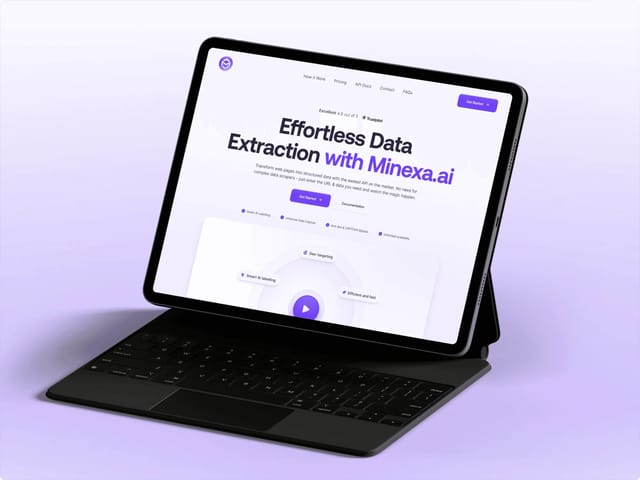
- [Minexa.ai](/work/minexa-ai): a web-data extraction platform with a Chrome extension and an API. We designed and built a product-led site that explains one core workflow first, then gives developers a separate path to reuse a trained scraper through the API.
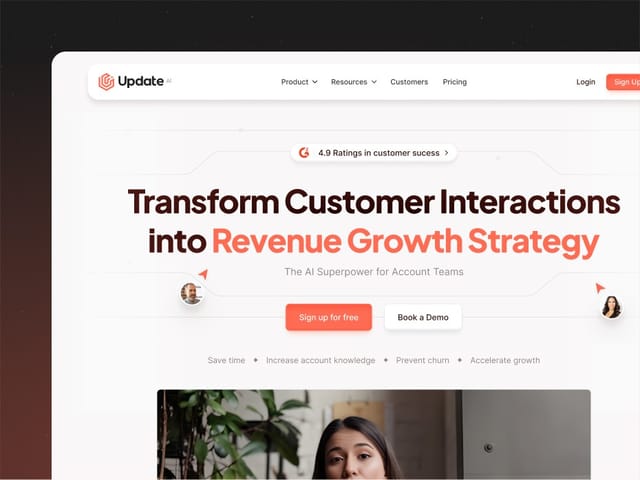
- [Update.ai](/work/update-ai): an AI customer-intelligence platform. We handled strategy, product storytelling and the Framer build, with product visuals made from the real interface.
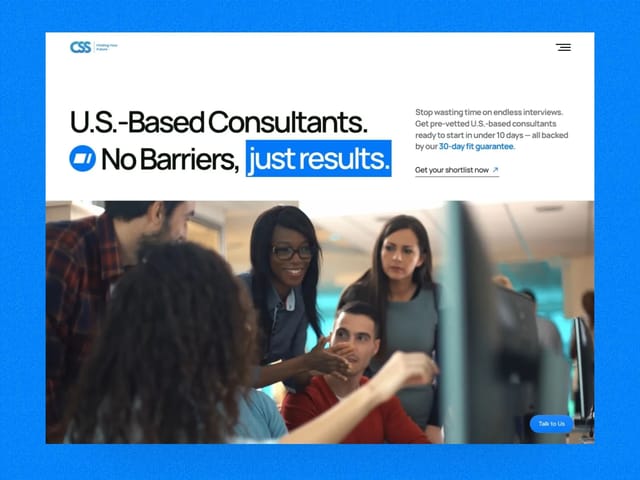
- [CSSinc.ai](/work/cssinc-ai): an enterprise IT consultancy whose site had stalled with a previous team. We rewrote the narrative and rebuilt it in Framer.
How do we work with devtool startups?
Intro call
A free 30-minute call. We look at your product, docs, GitHub and current site, and recommend a sprint, a site, a retainer or a trial week.
Try the product
We install it, read the docs and make a first call, so the copy describes what a developer actually experiences.
Positioning and copy
We write first: who it's for, what it replaces, the snippet that proves it, and the pricing units in plain words.
Brand and system
We set or refresh the identity, with type and color rules for code, docs and product UI.
Design and build
Custom design in Figma, then a Next.js build with a CMS, real code blocks and a clean handoff to your docs.
Launch and grow
Analytics, SEO and AI-search checks, then a handover your engineers can maintain, or a retainer for ongoing pages and product work.
What does a developer tools website cost?
Our website package is $8,000 fixed for up to six pages, plus $500 per extra page, and it includes copy, custom design, the Next.js build, a CMS and animation. Typical ranges we see quoted for Next.js agency builds run from about $20,000 to $120,000, and they vary widely with scope, so compare what each quote includes. Timelines are scoped on the intro call.
- Brand and design sprint
- $3,000
- Website, up to 6 pages, Next.js
- $8,000
- Design and development retainer
- $6,000/mo
Hypothetical example: what a six-page devtools site could cover
For example, suppose an open-source database startup has a GitHub repo, a docs site and a waitlist page. A six-page site might be: home, product overview, pricing with the free tier and cloud plans, a use case page for its main workload, a security page for its first enterprise buyers, and a changelog fed from releases. Docs stay where they are, restyled to match. This is an illustration, not a real client.
If you'd rather test the fit first, the $1,000 trial week is one week of design and development. Our devtools website cost guide explains what drives the price. The next step is a free 30-minute call.